Here’s the story of why and how I built my latest project, El Cambio, in just a few hours using modern web technologies and AI coding tools. It’s open source and available on GitHub at: https://github.com/Sneyder2328/bcv-rates
What it is
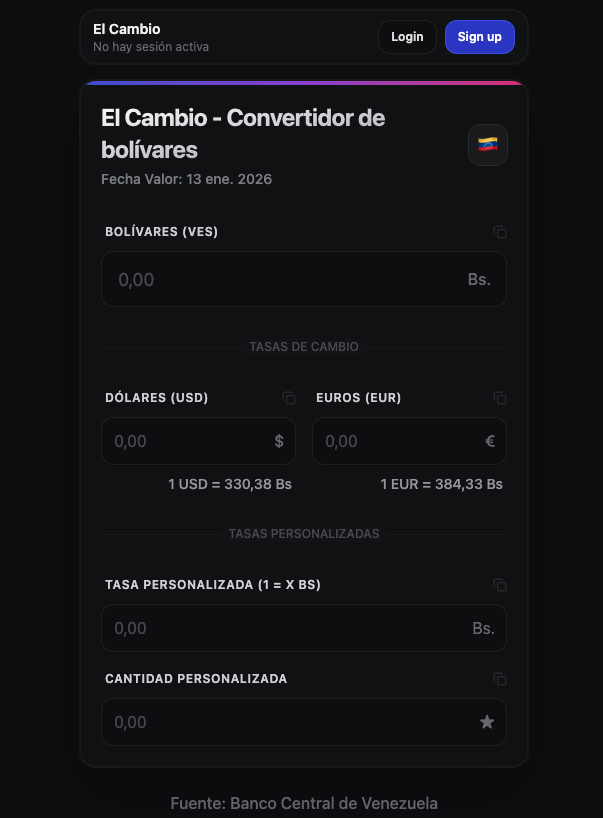
El Cambio is a web application that displays updated exchange rates published by the BCV (Venezuelan Central Bank) and allows for seamless conversion of bolivars.
Why I built it
First, I want to provide some context on the situation here in Venezuela. It should come as no surprise that for a long time we have experienced some of the highest inflation indexes in the world. As of now (early 2026), our official currency is the Venezuelan bolivar, which is still widely used for most day-to-day transactions as a medium of exchange. However, as you can imagine, such high inflation has made it impossible to use the bolivar as a unit of account. Prices for pretty much everything, from wages to services and food, are mostly established based on USD or in EUR. It’s gotten to the point where even some government fines are set in euros.
That creates a very practical problem: when you need to do a bank transfer, calculate a payment, or convert between currencies, you often end up manually checking the rate on the Venezuelan Central Bank’s website and doing the math yourself.
To make conversions easier, a significant portion of the population uses mobile apps such as Al Cambio. I used to use it myself, but the app is laggy and displays an annoying interstitial ad each time you open it. It also only allows for single-currency conversions, so I decided to build an alternative on my own that would be faster and smoother.
How I built it
I wanted an application accessible on both mobile and desktop that could also work offline. So I set it up as a Progressive Web Application using React with Vite as the build tool, Tailwind and shadcn for a sleek and extendable UI, and Firebase Auth for quickly adding optional authentication.
For the server, I chose NestJS with tRPC, Prisma ORM, and PostgreSQL as the database. These decisions were mostly based on the modern, type-safe tech stack I now use for most of my projects, which I described in greater detail in this tutorial post series.
Following the approach described in this other tutorial post series, I handled the scaffolding for the monorepo, the React web app, and the NestJS server manually. Then I let the AI handle the coding by providing specific details for how I wanted the app to work.
I used GPT-5.2 with extra-high reasoning on Cursor for most of the coding, and I used Gemini 3 Pro in Antigravity for building a stunning UI. I literally told it to make it look stunning using dark mode, and I very much liked the result it gave me.
After a few iterations and some manual fixing of details, I got everything working in just a few hours. The result was pretty satisfying: a sharp web app that loads almost instantly and works well offline after the first online load. It uses a cron job on the server for fetching exchange rates and updating the database, and it has an auth system that allows logged-in users to save and use custom exchange rates, since that is a common use case too.
Screenshots
Deployment
For deployment, I have a VPS that I use for most of my servers, so I used it for the NestJS server as well. Setup was straightforward: Nginx for routing, TLS via Let’s Encrypt, and GitHub Actions to automatically deploy whenever I push to the main branch.
For the React web app, I deployed to Vercel to take advantage of CDN distribution and improve latency.
Final Thoughts
This project was a reminder of how satisfying and even empowering it can be to build something that solves a real problem you face every day. What used to be a tedious process of manually checking exchange rates and doing the math yourself is now just a quick glance at an app that actually works well.
If you are Venezuelan or simply curious about the project, feel free to check it out at El Cambio or explore the source code on GitHub. Contributions and feedback are always welcome. And if you run into issues, have feature ideas, or want to contribute, feel free to open an issue or a pull request. I’d love to keep improving it based on real usage.